API Testing
Morphis ships two complementary tools for testing your API locally:
morphis route:list— a CLI command that prints every registered route, its HTTP verb, action name, and attached middlewaremorphis-scalar— a standalone preview server that reads your OpenAPI document and serves an interactive Scalar UI where you can call endpoints directly from the browser
Inspect routes in the terminal
Run route:list at any time without starting the dev server:
morphis route:list --server=api --format=tableExample output for the my-backend project with a PostController:
Domain | Method | Endpoint   | Action                | Middleware
-------+--------+------------+-----------------------+---------------------------------------------------
api    | GET    | /          | <anonymous>           | LoggerMiddleware, TrackMiddleware, CorsMiddleware
api    | GET    | /posts     | postController.list   | LoggerMiddleware, TrackMiddleware, CorsMiddleware
api    | GET    | /posts/:id | postController.get    | LoggerMiddleware, TrackMiddleware, CorsMiddleware
api    | POST   | /posts     | postController.create | LoggerMiddleware, TrackMiddleware, CorsMiddleware
api    | PUT    | /posts/:id | postController.update | LoggerMiddleware, TrackMiddleware, CorsMiddleware
api    | DELETE | /posts/:id | postController.delete | LoggerMiddleware, TrackMiddleware, CorsMiddleware
Other available formats:
morphis route:list --server=api --format=json      # machine-readable JSON
morphis route:list --server=api --format=openapi   # full OpenAPI 3.1 document
Interactive preview with morphis-scalar
morphis-scalar is a separate package that keeps API preview tooling outside the Morphis runtime. Pull it once alongside your project:
Clone the preview tool
Keep morphis-scalar as a sibling of your project folder:
git clone https://github.com/kentng201/morphis-scalar
cd morphis-scalar
bun install
Your workspace layout should look like this:
/
├── morphis-scalar/
└── my-backend/
    ├── src/
    │   └── routes/
    │       └── api.ts
    └── .env.api
Create a Morphis project
If you do not already have a project, scaffold one:
morphis new my-backend
cd my-backend
bun install
Start the preview server
From the morphis-scalar directory, point the preview at your project:
cd ../morphis-scalar
bun run preview --project=../my-backend --server=api --open
--open opens the browser automatically. The preview server starts on http://127.0.0.1:4173 by default.
Add --watch to auto-reload the OpenAPI document whenever you change a route or validator.
Browse the Scalar UI
Once running, the preview looks like this:
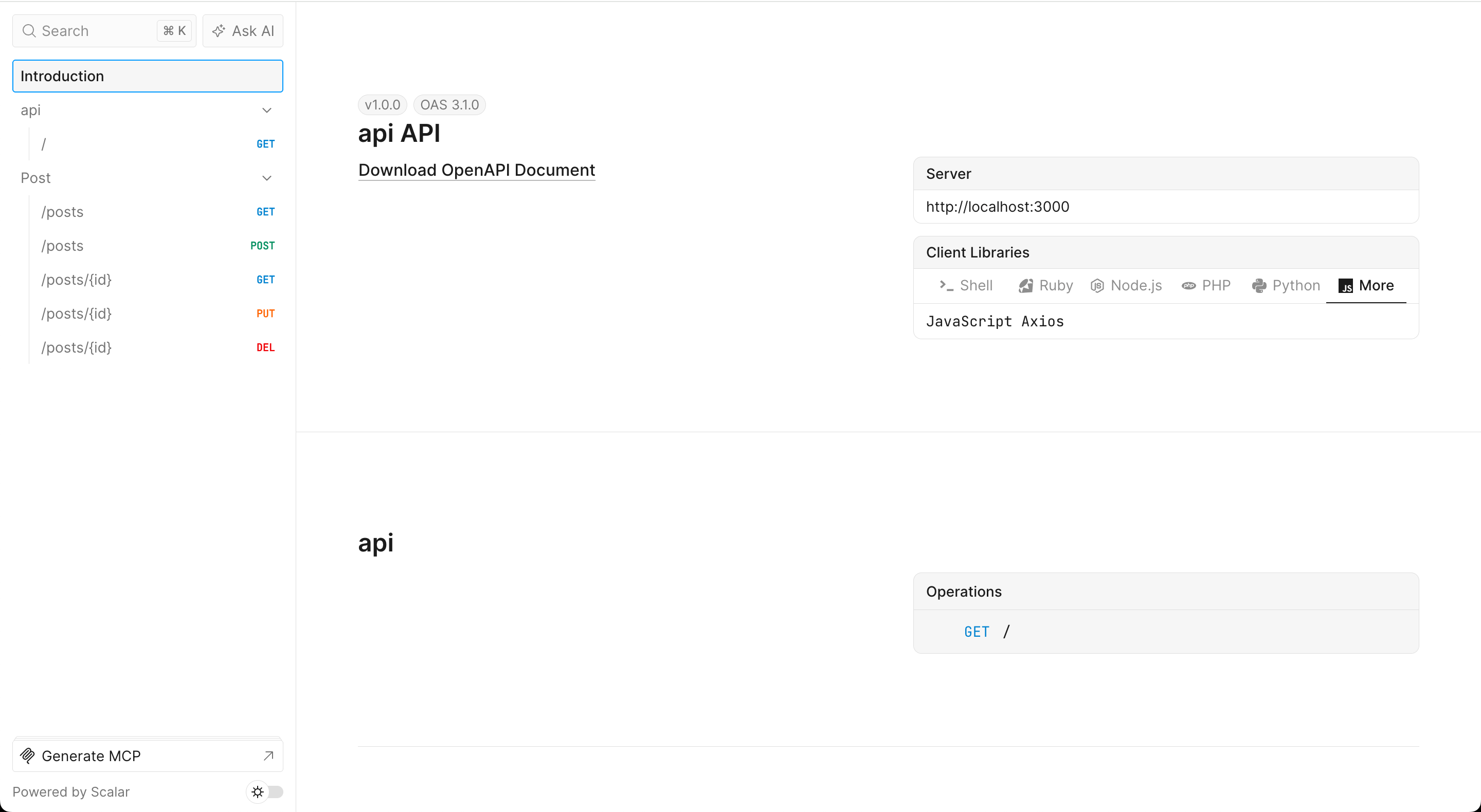
The left sidebar lists every tag (api, Post) and every endpoint under it. The main panel shows the server URL, API version, and ready-to-use client library snippets (Shell, Ruby, Node.js, PHP, Python, and more).
Trying an endpoint
1 — Expand an endpoint
Click any route in the sidebar to navigate to its detail view. Scalar renders the full schema directly from your @Validate decorators. Take POST /posts as an example:
import { Validator, type SimpleValidationRuleMap } from 'morphis';

export type PostBody = { title: string; body: string; status: string };

export class PostBodyValidator extends Validator<PostBody> {
    getSimpleRules(): SimpleValidationRuleMap<PostBody> {
        const { Required, Length, In } = this.rules;
        return {
            title:  [Required, Length(255)],
            body:   [Required, Length(10000)],
            status: [Required, In('draft', 'published', 'archived')],
        };
    }
}import { Controller, type Request, Post, Validate } from 'morphis';
import { PostBodyValidator } from '../validators/PostBodyValidator';
@Controller('posts')
export class PostController {
@Post()
@Validate({ body: PostBodyValidator })
async create(req: Request) {
return req.body;
}
}
export default new PostController();Scalar turns each rule into its OpenAPI equivalent automatically — no separate schema file needed:
| Validator rule | OpenAPI output |
|---|---|
Required | required: true |
Length(255) | maxLength: 255 |
In('draft', 'published', 'archived') | enum: [draft, published, archived] |
The result in the UI:
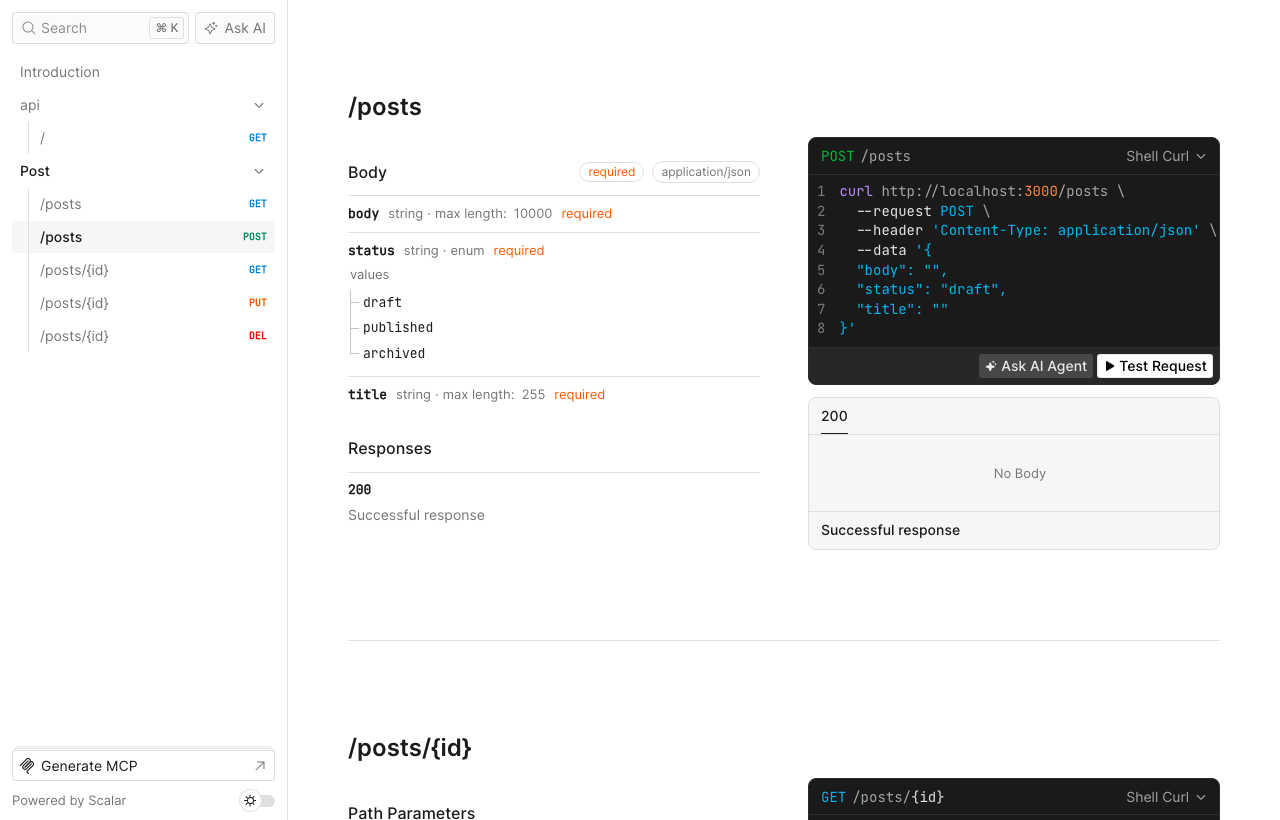
body— string · max 10 000 · requiredstatus— string · enum (draft/published/archived) · requiredtitle— string · max 255 · required- Curl snippet — pre-filled with the current body shape so you can copy and run it immediately
- Test Request button — opens the interactive sending panel
2 — Send a request
Click Test Request to open the interactive panel. The form is pre-populated with all required fields and the first enum value as the default:
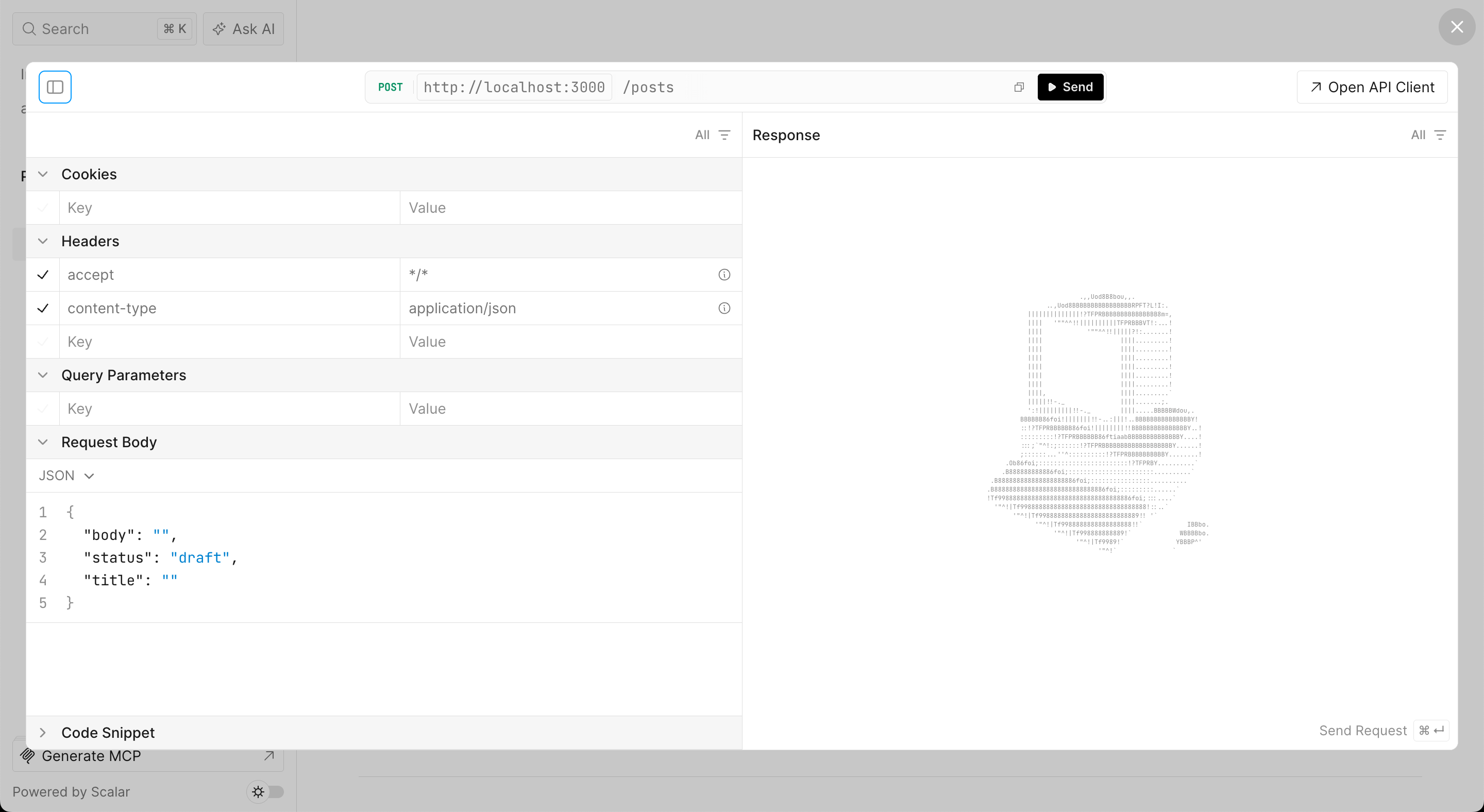
- Headers —
accept: */*andcontent-type: application/jsonare pre-filled automatically - Request Body — a live JSON editor pre-populated with
body,status: "draft", andtitle - Send — fires the request against
http://localhost:3000and streams the response on the right
Anything declared with Required in your validator will appear in the request body scaffold. In(...) values are recognised as enums and the first option is used as the default.
Testing against a remote server
By default, Scalar points requests at http://localhost:3000 (the value of PORT in your .env.api). To test a staging or production server, set HOST — or one of the more specific overrides — in the same env file.
Using HOST
NAME=api
PORT=3000
MULTI_THREAD=true

HOST=api.example.com
Morphis builds the server URL as http://<HOST>:<PORT>, so the above produces http://api.example.com:3000. To use HTTPS and omit the port, add PROTOCOL and leave PORT blank (or set EXPOSE_PORT):
NAME=api
PORT=443
MULTI_THREAD=true

HOST=api.example.com
PROTOCOL=https
This produces https://api.example.com.
Using EXPOSE_URL (full URL override)
For the simplest override, set a complete URL — this takes priority over all other variables:
EXPOSE_URL=https://api.example.com/v1Variable priority
Morphis resolves the OpenAPI servers[].url in this order — first match wins:
| Priority | Variable | Example |
|---|---|---|
| 1 | EXPOSE_URL | https://api.example.com/v1 |
| 2 | APP_URL / BASE_URL / PUBLIC_URL / SERVER_URL / API_URL | https://api.example.com |
| 3 | EXPOSE_HOST or HOST + EXPOSE_PORT or PORT + EXPOSE_PROTOCOL or PROTOCOL / HTTPS | pieces assembled |
| 4 | (default) | http://localhost:3000 |
When pointing Scalar at a remote server, re-run morphis route:list (or restart the preview with --watch) so the server URL in the UI reflects the updated env file.
| Flag | Default | Description |
|---|---|---|
--project=<dir> | — | Morphis project directory to run route:list in |
--server=<name> | — | Server name (matches src/routes/<name>.ts) |
--input=<file> | — | Load OpenAPI JSON from a file instead |
--host=<host> | 127.0.0.1 | Preview server host |
--port=<port> | 4173 | Preview server port |
--open | false | Open browser on start |
--watch | false | Reload when source changes |
--title=<title> | server name | Override OpenAPI info.title |
--version=<ver> | 1.0.0 | Override OpenAPI info.version |